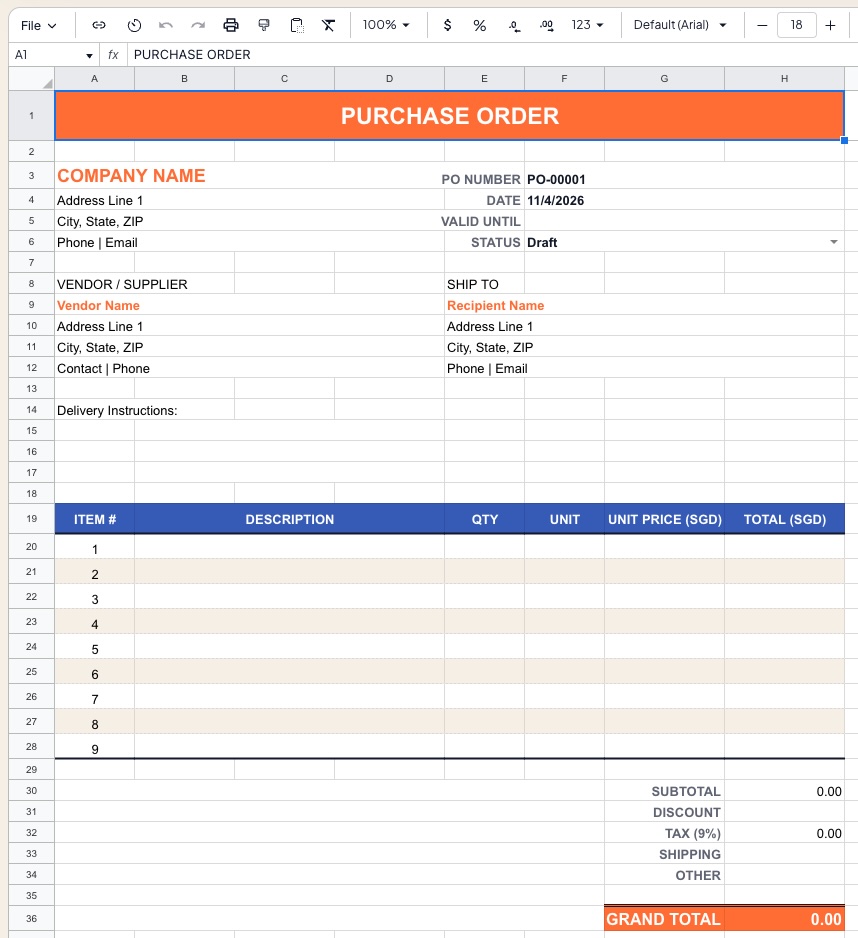
This Purchase Order Template provides a structured, print-ready document for issuing formal procurement requests to vendors and suppliers. It captures all essential order details — supplier information, line item descriptions, quantities, unit prices, and delivery terms — and automatically calculates subtotals, tax, shipping, and the final order total.
Suitable for small and medium businesses managing supplier relationships, procurement teams issuing formal buying authority, retail and e-commerce businesses replenishing inventory, and any organization needing an audit trail for purchasing approvals.
Template Structure
| Section | Description |
|---|
Company Header | Issuing company branding, address, and contact details |
PO Metadata | Purchase order number, date, and delivery details |
Vendor Details | Supplier name, address, and contact information |
Ship To | Delivery destination address |
Line Items Table | Itemized list of goods or services ordered |
Totals Panel | Subtotal, discount, tax, shipping, and grand total |
Payment & Delivery Terms | agreed terms, due date, and shipping method |
Notes & Authorization | Internal notes, authorized signature, and approval |
Company Header
Populated once and reused across all purchase orders:
| Field | Description |
|---|
| Company Name | Legal or trading name of the buying organization |
| Address | Street, city, state/country, and postal code |
| Phone | Primary contact number |
| Email | Procurement or accounts payable email |
| Website | Company URL |
| Logo | Insert company logo above or alongside the name |
Purchase Order Metadata
| Field | Example | Description |
|---|
| PO Number | PO-2026-0042 | Unique sequential reference number |
| PO Date | April 11, 2026 | Date the order is issued |
| Required By Date | April 25, 2026 | Requested delivery or completion date |
| Delivery Method | Standard Freight | Courier, freight, express, or pickup |
| Payment Terms | Net 30 | Number of days until payment is due |
| Currency | SGD | Order currency — configurable |
Vendor / Supplier Details
| Field | Description |
|---|
| Vendor Name | Supplier company or individual name |
| Vendor ID | Internal supplier reference code |
| Contact Person | Account manager or sales representative |
| Address | Full supplier mailing address |
| Phone | Supplier contact number |
| Email | Supplier accounts or order confirmation email |
Ship To
| Field | Description |
|---|
| Recipient Name | Person or department receiving the goods |
| Company Name | Receiving entity if different from issuing company |
| Delivery Address | Full delivery address including floor/unit |
| City / State / ZIP | Location details |
| Special Instructions | Dock number, access hours, fragile handling notes |
Line Items Table
One row per product or service ordered:
| Column | Description |
|---|
| # | Line item number |
| Item Code / SKU | Supplier or internal product reference |
| Description | Full product or service name and specification |
| Unit of Measure | Each, kg, box, hour, license, etc. |
| Qty | Quantity ordered |
| Unit Price | Price per unit in order currency |
| Discount (%) | Optional line-level discount percentage |
| Amount | Auto-calculated: Qty × Unit Price × (1 − Discount) |
The template supports up to 20 line items by default — insert rows above the totals panel to extend as needed.
Totals Panel
| Row | Description |
|---|
| Subtotal | Sum of all line item amounts |
| Line Discount | Total discount applied across all line items |
| Shipping & Handling | Freight or delivery charge |
| Tax / GST (%) | Configurable tax rate applied to taxable subtotal |
| Grand Total | Final amount payable to vendor |
Grand Total is bold and highlighted — this is the binding order value communicated to the supplier.
Payment & Delivery Terms
| Field | Example | Description |
|---|
| Payment Terms | Net 30 | Days from invoice date until payment due |
| Payment Method | Bank Transfer | Wire, cheque, credit card, or cash on delivery |
| Bank / Account Details | — | Optional field for prepayment scenarios |
| Incoterms | FOB Destination | Freight responsibility and risk transfer point |
| Partial Deliveries | Accepted / Not Accepted | Whether split shipments are permitted |
| Return Policy Reference | Refer to Vendor Agreement | Link to returns or RMA process |
Notes & Authorization
| Field | Description |
|---|
| Notes to Vendor | Special instructions, packaging requirements, compliance notes |
| Internal Reference | Department, project code, or cost center allocation |
| Prepared By | Name of the person creating the PO |
| Authorized By | Name and title of the approving manager |
| Signature | Handwritten or digital signature field |
| Authorization Date | Date the PO was formally approved |
A second signature line supports dual-authorization workflows for high-value orders.
PO Number Convention
Recommended format: PO-YYYY-NNNN
| Component | Description |
|---|
| PO | Fixed prefix identifying the document type |
| YYYY | Four-digit year of issue |
| NNNN | Sequential four-digit order number, resetting annually |
Example: PO-2026-0042 is the 42nd purchase order issued in 2026.
Formatting Conventions
- 🔵 Blue font — user-editable input cells
- ⚫ Black font — auto-calculated formula cells (do not edit)
- Dark navy header band — company name and PO title bar
- Dark section bands — Vendor Details, Ship To, Line Items header row
- Bold grand total row — highlighted for clear communication of order value
- Print area set to fit one A4 or Letter page in portrait orientation
- Gridlines hidden for a clean, document-style appearance
How to Use
- Add your company name, address, and logo to the header (do once; save as master template)
- Assign the next sequential PO Number from your register
- Enter PO Date, Required By Date, and payment / delivery terms
- Fill in Vendor details for the selected supplier
- Enter Ship To address if different from your company address
- Add line items — item code, description, unit of measure, quantity, and unit price
- Apply any line-level discounts; enter shipping charges and tax rate in the Totals panel
- Add internal notes and obtain authorized signature
- Save as
PO-2026-0042_VendorName.xlsx, export to PDF, and send to supplier
- File a copy in your procurement register for audit and payment matching
Procurement Register (Companion Sheet)
An optional Register tab tracks all issued POs in a single log:
| Column | Description |
|---|
| PO Number | Unique reference |
| Issue Date | Date PO was sent |
| Vendor Name | Supplier |
| Description | Brief summary of order |
| Grand Total | Binding order value |
| Status | Draft / Sent / Acknowledged / Received / Closed |
| Invoice # | Matched supplier invoice reference |
| Payment Date | Date payment was made |
Requirements
- Microsoft Excel 2016+ or Excel 365 (Windows or Mac)
- No macros required — fully formula-based
- Compatible with Google Sheets
- PDF export recommended for sending to suppliers
- Print-ready layout for physical signing and filing
Limitations & Caveats
This is a single-document template, not a procurement management system. It does not track inventory levels, supplier performance, or multi-PO budgets automatically.
- No automatic PO number incrementing — update manually per order
- Multi-currency orders require manual exchange rate input
- Does not integrate with ERP, inventory, or accounts payable systems
- For high-volume procurement, consider linking the Register tab to a master supplier database or migrating to a dedicated procurement platform
Changelog
| Version | Date | Notes |
|---|
| v1.0 | Feb 2024 | Initial release — line items, totals, vendor details |
| v1.5 | Aug 2024 | Added Ship To section, discount column, payment terms panel |
| v2.0 | Apr 2026 | Procurement register tab, dual authorization, Incoterms field, GST line |