
About Invoice Template
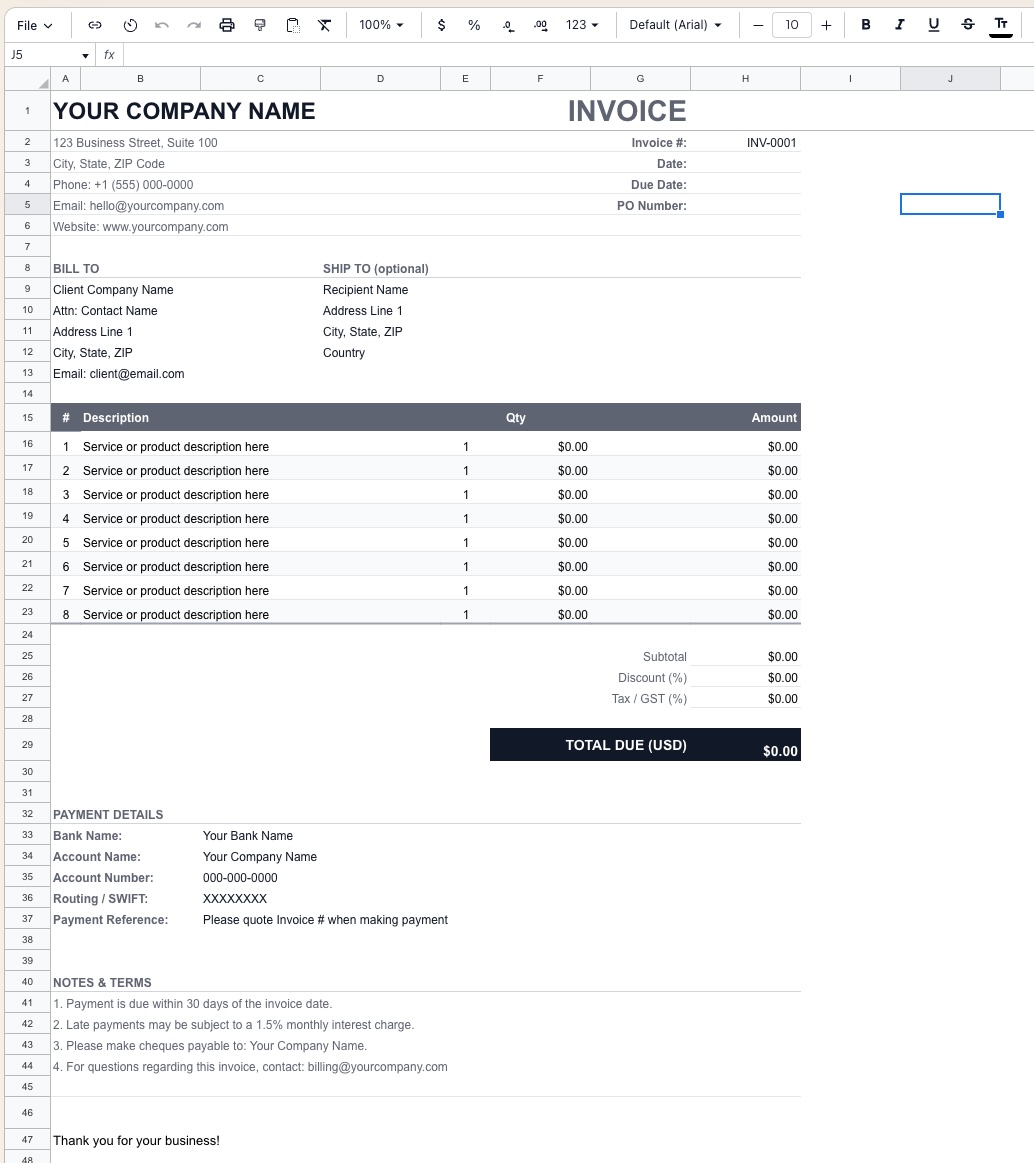
This Invoice Template provides a fully structured, print-ready billing document built entirely in Excel. Fill in your company details once, and reuse it for every client engagement. Totals, tax, and discounts calculate automatically — just enter line items and send.
Suitable for freelancers billing clients, agencies invoicing project work, product businesses issuing sales invoices, and any business needing a professional, customizable invoice without dedicated billing software.
Template Structure
The template is organized as a single print-optimized sheet with clearly delineated sections:
| Section | Rows | Purpose |
|---|---|---|
| Company Header | 1–6 | Your branding, address, and contact details |
| Invoice Metadata | 1–5 (right) | Invoice #, date, due date, PO number |
| Bill To / Ship To | 8–13 | Client billing and optional shipping address |
| Line Items | 15–23 | Itemized services or products |
| Totals | 25–29 | Subtotal, discount, tax, and amount due |
| Payment Details | 32–37 | Bank and wire transfer instructions |
| Notes & Terms | 40–44 | Payment terms, late fees, and contact info |
Key Features
Company Header
- Company name (large, bold — your primary branding element)
- Full address, phone, email, and website
- Designed for logo insertion above or alongside the company name
Invoice Metadata
| Field | Description |
|---|---|
| Invoice # | Auto-incrementable reference number (e.g. INV-0001) |
| Date | Invoice issue date |
| Due Date | Payment deadline — typically Net 30 from issue date |
| PO Number | Client's purchase order reference if applicable |
Bill To / Ship To
- Bill To — client company name, attention contact, address lines, city/state/ZIP, and email
- Ship To (optional) — separate delivery address for product invoices; leave blank for service invoices
Line Items Table
Up to 8 line items by default (expandable by inserting rows):
| Column | Description |
|---|---|
| # | Line item number |
| Description | Service or product description — free text |
| Qty | Quantity of units delivered |
| Unit Price | Rate per unit ($/hr, $/unit, flat fee) |
| Amount | Auto-calculated: Qty × Unit Price |
Totals Panel
| Row | Description |
|---|---|
| Subtotal | Sum of all line item amounts |
| Discount (%) | Optional percentage discount applied to subtotal |
| Tax / GST (%) | Configurable tax rate (GST, VAT, sales tax) |
| Total Due | Final amount payable, bold and highlighted |
Currency defaults to USD — change the label to SGD, AUD, GBP, or any local currency as needed.
Payment Details
Structured payment instruction block including:
- Bank Name
- Account Name
- Account Number
- Routing / SWIFT code
- Payment Reference instruction (quote Invoice # when paying)
Supports both domestic ACH/bank transfer and international SWIFT wire formats.
Notes & Terms
Pre-filled with standard business payment terms, fully editable:
- Payment due within 30 days of invoice date
- Late payments subject to 1.5% monthly interest charge
- Cheque payable instructions
- Billing contact for invoice queries
Formatting Conventions
- Bold dark header band — line items table header and Total Due row for visual hierarchy
- Right-aligned currency values — consistent number formatting throughout
- Blue font — user-editable input fields
- Black font — auto-calculated formula cells (do not edit)
- Print area pre-set to fit one A4 or Letter page
- Gridlines hidden for a clean, document-style appearance
How to Use
- Replace
YOUR COMPANY NAMEand address details in the header (do this once; save as your master template) - Fill in Invoice #, Date, Due Date, and PO Number for each new invoice
- Enter client details in the Bill To section
- Add line items — description, quantity, and unit price
- Set Discount % and Tax / GST % as applicable
- Update Payment Details with your bank information
- Review Notes & Terms and adjust to match your standard contract language
- Save a copy as
INV-0001_ClientName.xlsxand export to PDF for sending
Requirements
- Microsoft Excel 2016+ or Excel 365 (Windows or Mac)
- No macros required — fully formula-based
- Compatible with Google Sheets
- PDF export recommended for client delivery
Limitations & Caveats
This is a single-invoice template, not an invoicing system. It does not track payment status, outstanding receivables, or client history.
- No automatic invoice numbering — increment manually per invoice
- Multi-currency invoices require manual rate conversion
- For high-volume billing, consider connecting this template to a tracker sheet or migrating to dedicated invoicing software
Changelog
| Version | Date | Notes |
|---|---|---|
| v1.0 | Jan 2024 | Initial release — single sheet invoice |
| v1.5 | Jun 2024 | Added Ship To section, discount row, GST label |
| v2.0 | Apr 2026 | Payment details block, notes section, print area optimization |