About Weekly Timesheet
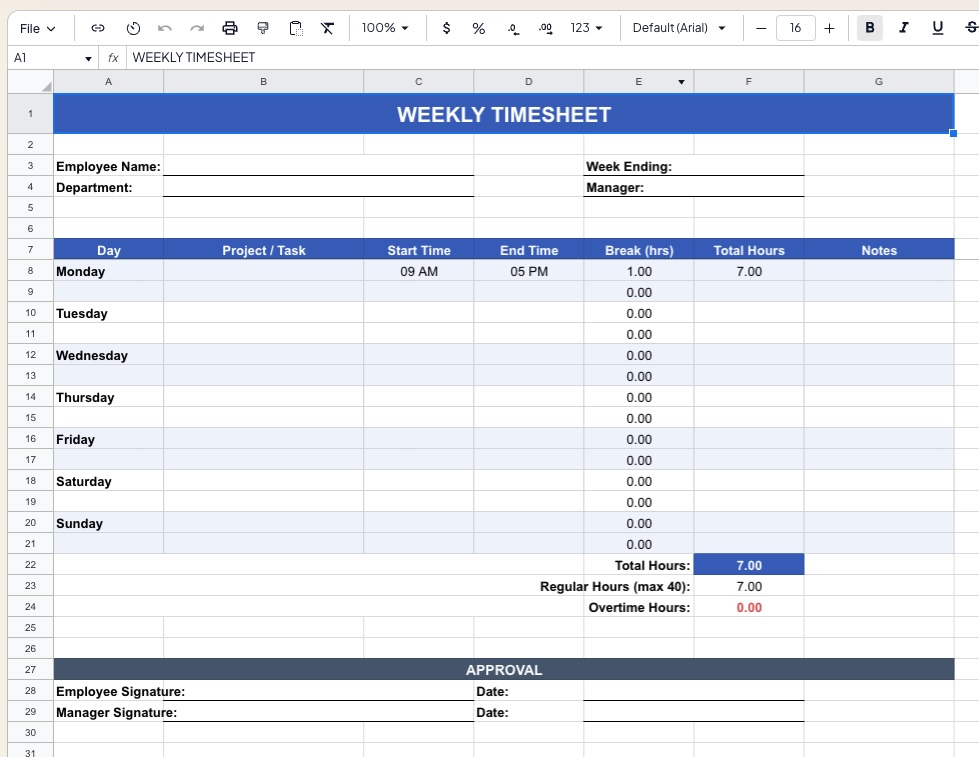
This Weekly Timesheet Template provides a clean, professional solution for logging employee work hours on a day-by-day basis. It automatically calculates regular hours, overtime, total pay, and weekly summaries — eliminating manual arithmetic and ensuring consistent, audit-ready time records.
Suitable for employees submitting hours to payroll, freelancers tracking billable time per client, managers reviewing team hour logs, and small businesses without dedicated HR software.
Template Structure
| Section | Description |
|---|---|
Employee Info | Name, department, manager, pay period, and employee ID |
Daily Time Log | Clock-in/out entries with break deduction per day |
Hours Summary | Regular, overtime, and total hours computed automatically |
Pay Calculation | Gross pay based on hourly rate and overtime multiplier |
Project / Task Breakdown | Optional allocation of hours to projects or cost codes |
Approval Panel | Employee signature, manager approval, and submission date |
Employee Information Panel
Filled in once per timesheet period:
| Field | Description |
|---|---|
| Employee Name | Full legal name |
| Employee ID | Payroll or HR system reference number |
| Department | Team or business unit |
| Manager / Supervisor | Approving manager's name |
| Pay Period Start | First day of the week (e.g. Monday) |
| Pay Period End | Last day of the week (auto-calculated) |
| Hourly Rate | Base pay rate in local currency |
| Overtime Multiplier | Typically 1.5× for standard overtime |
Daily Time Log
One row per day, Monday through Sunday:
| Column | Description |
|---|---|
| Day | Monday – Sunday |
| Date | Auto-populated from Pay Period Start |
| Time In | Clock-in time (e.g. 09:00) |
| Lunch Break (mins) | Break duration deducted from total |
| Time Out | Clock-out time (e.g. 18:00) |
| Regular Hours | Hours up to the daily threshold (default: 8 hrs) |
| Overtime Hours | Hours beyond the daily threshold |
| Total Hours | Regular + Overtime for the day |
| Notes | Late arrival, leave type, public holiday flag |
Hours Summary Panel
Auto-calculated from the daily log:
| Output | Description |
|---|---|
| Total Regular Hours | Sum of regular hours across all 7 days |
| Total Overtime Hours | Sum of overtime hours across all 7 days |
| Total Hours Worked | Combined regular and overtime hours |
| Days Worked | Count of days with a non-zero time entry |
| Average Hours/Day | Total hours ÷ days worked |
Pay Calculation
| Output | Description |
|---|---|
| Regular Pay | Regular Hours × Hourly Rate |
| Overtime Pay | Overtime Hours × Hourly Rate × Overtime Multiplier |
| Gross Pay | Regular Pay + Overtime Pay |
Tax, CPF, and other statutory deductions are not included — gross pay is the pre-deduction total. Connect to your payroll system or apply deductions separately.
Project / Task Breakdown (Optional)
A secondary table for allocating hours to specific projects, clients, or cost codes — useful for agencies, consultancies, or project-based businesses:
| Column | Description |
|---|---|
| Project / Client Name | Free-text label |
| Cost Code | Internal billing or GL code |
| Mon – Sun | Hours allocated per day |
| Total Hours | Row sum across the week |
Row totals must reconcile with the daily log — a validation check highlights any discrepancy in red.
Overtime Rules Configuration
Overtime thresholds are configurable in a settings panel:
| Setting | Default | Description |
|---|---|---|
| Daily OT Threshold | 8 hrs | Hours beyond this per day count as overtime |
| Weekly OT Threshold | 44 hrs | Alternative weekly cap trigger |
| OT Calculation Method | Daily | Toggle between daily or weekly OT basis |
| Weekend Rate Multiplier | 1.5× | Separate multiplier for Saturday/Sunday |
| Public Holiday Multiplier | 2.0× | Applied when PH flag is set in Notes column |
Approval Panel
| Field | Description |
|---|---|
| Employee Declaration | Confirms hours are accurate and complete |
| Employee Signature | Name + date of submission |
| Manager Review | Approved / Rejected / Pending status dropdown |
| Manager Signature | Name + date of approval |
| Payroll Processed | Checkbox confirming submission to payroll |
| Comments | Free-text field for manager notes or adjustments |
Formatting Conventions
- 🔵 Blue font — user-editable input cells
- ⚫ Black font — auto-calculated formula cells
- 🟢 Green shading — approved or complete rows
- 🔴 Red shading — missing entries, reconciliation errors, or overtime flags
- Weekend rows (Saturday / Sunday) shaded in light grey for visual separation
- Print area optimized for A4 landscape — fits one full week on a single page
How to Use
- Enter employee information and pay period start date at the top
- Input Time In, Break, and Time Out for each working day
- Mark any public holidays or leave types in the Notes column
- Review the Hours Summary and Pay Calculation panels
- Optionally allocate hours to projects in the breakdown table
- Employee signs and submits; manager reviews and approves
- Save as
Timesheet_[Name]_[WeekEnding].xlsxand archive or forward to payroll
Requirements
- Microsoft Excel 2016+ or Excel 365 (Windows or Mac)
- No macros required — fully formula-based
- Compatible with Google Sheets
- Print-ready layout for physical signature and filing
Limitations & Caveats
This template tracks hours and computes gross pay only. It is not a payroll system and does not handle statutory deductions, leave balances, or multi-rate pay structures.
- Single employee per sheet — duplicate the tab for team use
- Does not support split shifts or multiple clock-in/out entries per day
- Leave accrual (annual, sick, unpaid) is not tracked
- For Singapore-based businesses: CPF contributions and MOM overtime caps should be applied separately in line with the Employment Act
Changelog
| Version | Date | Notes |
|---|---|---|
| v1.0 | Mar 2024 | Initial release — daily log and pay calculation |
| v1.5 | Sep 2024 | Added project breakdown table, approval panel |
| v2.0 | Apr 2026 | OT configuration panel, PH multiplier, reconciliation check |