About Mortgage Calculator
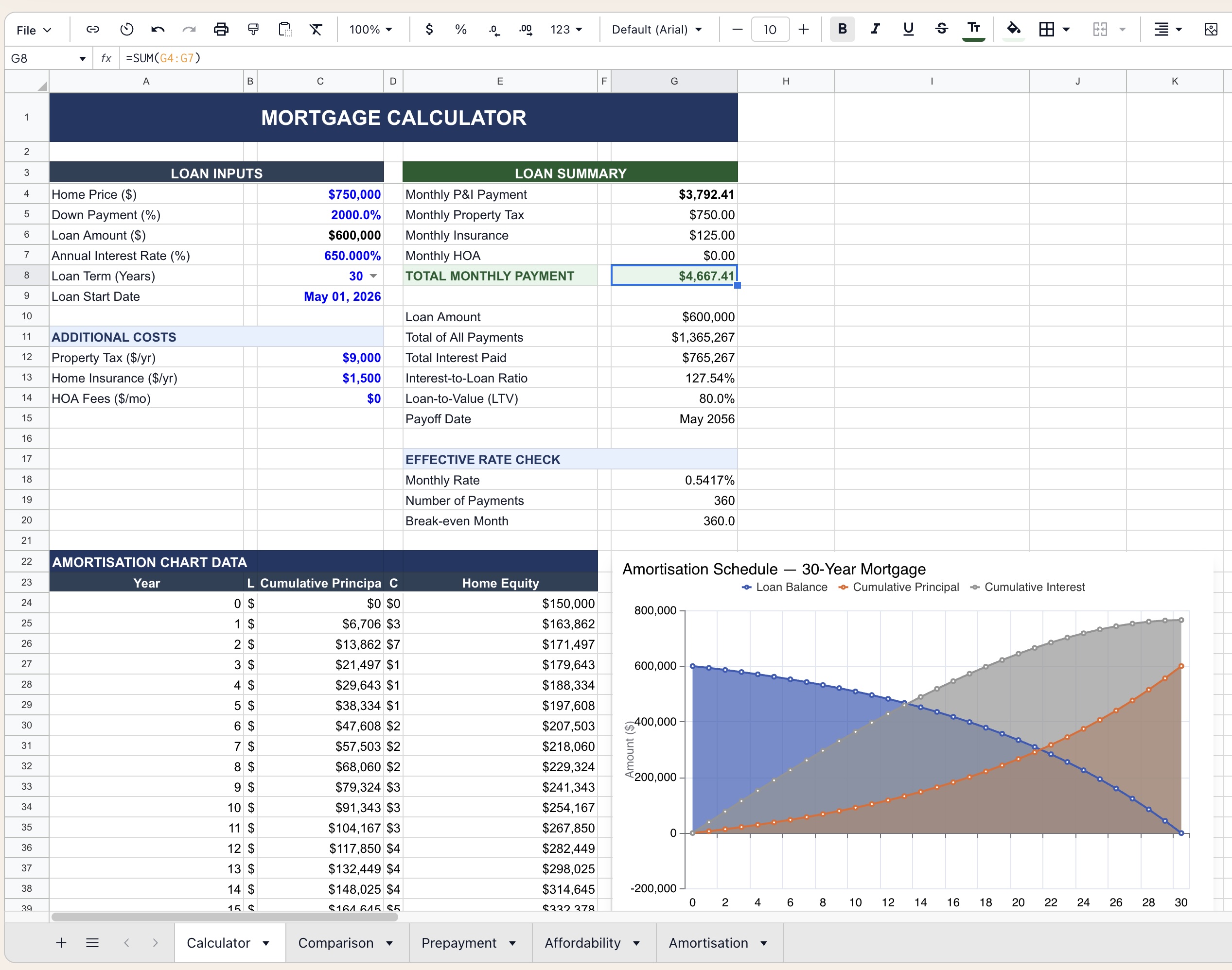
This Mortgage Calculator template provides a complete picture of your home loan — from monthly payment breakdown to full amortization schedule. Enter your loan parameters once and instantly see total interest cost, payoff timeline, equity buildup, and a visual amortization chart across the life of the loan.
Suitable for first-time homebuyers evaluating affordability, investors comparing financing scenarios, brokers presenting loan options to clients, and anyone refinancing and weighing term or rate tradeoffs.
Model Architecture
The template is organized across 5 interconnected sheets:
| Sheet | Purpose |
|---|---|
Calculator | Primary input panel, loan summary, and amortization chart |
Comparison | Side-by-side comparison of up to 3 loan scenarios |
Prepayment | Models the impact of extra monthly or lump-sum payments |
Affordability | Back-calculates maximum loan from income and DTI constraints |
Amortisation | Full month-by-month amortization schedule with equity tracking |
Key Features
Loan Inputs
- Home Price — purchase price of the property
- Down Payment (%) — automatically computes loan amount
- Annual Interest Rate — converts to monthly rate internally
- Loan Term — dropdown selector (10, 15, 20, 25, or 30 years)
- Loan Start Date — drives the payoff date and schedule calendar
Additional Costs
| Input | Description |
|---|---|
| Property Tax ($/yr) | Annual tax divided into monthly escrow |
| Home Insurance ($/yr) | Annual premium divided into monthly escrow |
| HOA Fees ($/mo) | Monthly homeowners association fee |
Loan Summary Panel
| Output | Description |
|---|---|
| Monthly P&I Payment | Principal + interest component only |
| Monthly Property Tax | Escrow portion |
| Monthly Insurance | Escrow portion |
| Monthly HOA | If applicable |
| Total Monthly Payment | All-in PITI + HOA obligation |
| Total of All Payments | Lifetime cash outflow |
| Total Interest Paid | True cost of borrowing |
| Interest-to-Loan Ratio | Interest as % of original principal |
| Loan-to-Value (LTV) | Flags PMI threshold at 80% |
| Payoff Date | Month and year of final payment |
Effective Rate Check
Validates the internal computation with a transparent breakdown of monthly rate, total number of payments, and break-even month — useful for catching data entry errors.
Amortisation Chart
A dynamic line and area chart visualizing three series across the full loan term:
- Loan Balance — declining curve from principal to zero
- Cumulative Principal Paid — rising from zero to full loan amount
- Cumulative Interest Paid — total interest accrued over time
The crossover point where cumulative principal exceeds cumulative interest is automatically visible — a powerful illustration of front-loaded interest in standard amortizing loans.
Amortisation Schedule
The Amortisation sheet generates a full month-by-month table including:
| Column | Description |
|---|---|
| Year / Month | Payment period |
| Opening Balance | Loan balance at start of period |
| Payment | Fixed monthly P&I |
| Principal | Principal portion of payment |
| Interest | Interest portion of payment |
| Closing Balance | Remaining loan balance |
| Cumulative Principal | Total principal repaid to date |
| Cumulative Interest | Total interest paid to date |
| Home Equity | Down payment + cumulative principal |
Formatting Conventions
- 🔵 Blue font — user-editable input cells
- ⚫ Black font — calculated outputs (do not edit)
- 🟢 Dark green header bands — section labels
- 🔴 Red highlighting — LTV above 80% (PMI likely required)
- All currency values display in USD with comma formatting
- Percentages display to 2 decimal places
Scenarios & Comparison
The Comparison sheet allows side-by-side evaluation of up to 3 loan options — useful for comparing a 15-year vs 30-year term, or a lower rate with higher fees against a no-cost loan. Outputs compared include total interest, monthly payment, break-even month, and lifetime cost.
Prepayment Analysis
The Prepayment sheet models the effect of paying extra principal, showing how much interest is saved and how many months are cut from the loan term for a given additional monthly payment or one-time lump sum.
Requirements
- Microsoft Excel 2016+ or Excel 365 (Windows or Mac)
- No macros required — fully formula-based
- Compatible with Google Sheets with minor chart adjustments
Limitations & Caveats
This template models a standard fixed-rate, fully amortizing mortgage. It does not cover ARM, interest-only, or balloon structures.
- PMI (Private Mortgage Insurance) is not automatically calculated — flag appears when LTV exceeds 80%
- Tax deductibility of mortgage interest is not modeled
- Rates and costs are illustrative — always verify with your lender's official Loan Estimate
Changelog
| Version | Date | Notes |
|---|---|---|
| v1.0 | Mar 2024 | Initial release — calculator + amortisation |
| v1.5 | Aug 2024 | Added comparison and prepayment sheets |
| v2.0 | Apr 2026 | Affordability tab, LTV flag, chart redesign |